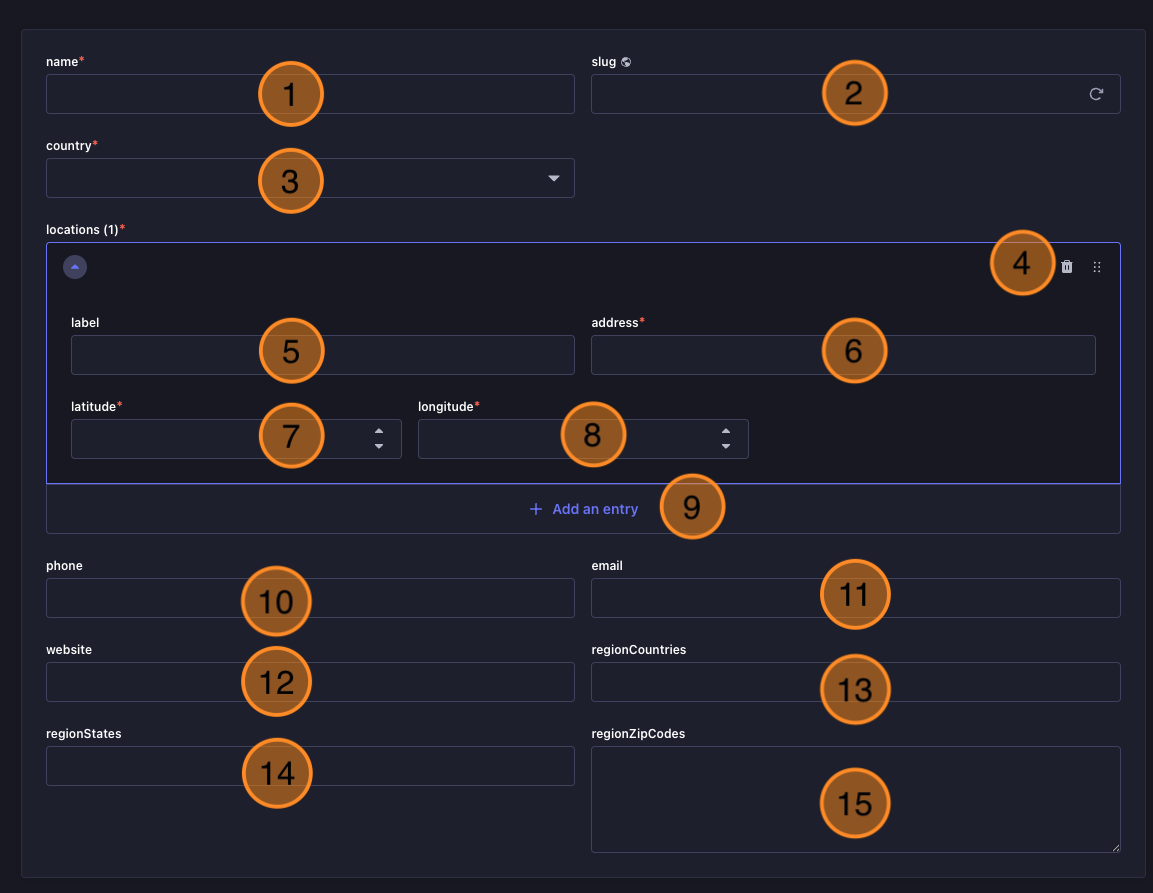
Name: The name of the dealer. This is a required field and will be displayed on the website.
Slug: A unique identifier for the dealer, used in the URL. It is automatically generated from the name but can be edited if needed.
Country: The country where the dealer is located. This is a required field and will be displayed on the website. Is mainly used for filtering dealers by country on the website.
Locations Controls: When multiple locations are inserted for this dealer you can order them here or remove them. The first location will be the one zoomed in by default when the dealer is selected on the website.
Location - label: The name of the specific location for this dealer.
Location - address: The physical address of the dealer's location.
Location - latitude: The latitude coordinate for the dealer's location, used for map display.
Location - longitude: The longitude coordinate for the dealer's location, used for map display.
Add an entry: Click this button to add a new location for the dealer. You can add multiple locations for a single dealer if they have more than one physical location.
Phone: The contact phone number for the dealer.
Email: The contact email address for the dealer.
Website: The URL for the dealer's website.
Region Countries: The country codes that this dealer serves separated by commas. This is used for filtering dealers by region on the website. For example, if a dealer serves both the United States and Canada, you would enter "US, CA" in this field.
Region States: The state codes that this dealer serves separated by commas. This is used for filtering dealers by region on the website. For example, if a dealer serves California and Texas, you would enter "CA, TX" in this field.
Region Zip Codes : The three-digit zip code prefixes that this dealer serves separated by commas. This is used for filtering dealers by region on the website. For example, if a dealer serves the zip codes starting with 900 and 901, you would enter "900, 901" in this field.